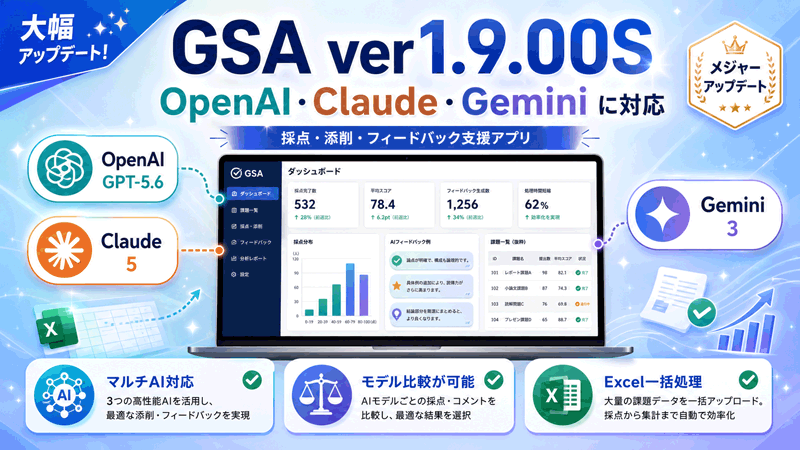
GSA (GPT-ScoreAid) is an AI-assisted tool designed to support the scoring of written responses, report review, and the generation of feedback for students.
GSA originally focused primarily on ChatGPT, but it now supports generative AI models from three major providers: OpenAI, Anthropic, and Google.
Supported models include:
- OpenAI GPT-5.6 (Sol / Terra / Luna)
- Anthropic Claude 5 series
- Google Gemini 3 series
Each AI model has different characteristics in terms of response quality, writing style, processing speed, and API usage cost. GSA allows users to select and compare multiple AI models using the same student responses, grading criteria, and prompts.
This makes it possible to investigate an important practical question:
“Which AI model is best suited to which types of educational tasks?”
In particular, GSA is intended to support practical research and experimentation in areas such as feedback generation for written assignments, report review, grading assistance, and classroom support.
GSA (GPT-ScoreAid) has been designed with an emphasis on:
- Evaluation based on scoring criteria and rubrics
- Feedback reflecting the instructor’s evaluation perspectives
- Batch and continuous processing of large numbers of responses organized in Excel files
- Clear presentation of scoring reasons and evaluation comments
- Comparison of results generated by different AI models
Generative AI is evolving rapidly. However, model performance alone is not enough. An equally important challenge is transforming these technologies into tools that can be used appropriately and effectively in real educational settings.
GSA is not intended to replace teachers or to delegate final grading decisions to AI. Scores, corrections, evaluations, and feedback generated by AI should be treated as reference information to support professional judgment. Users are expected to review the generated results and make the final educational decisions themselves.
GSA will continue to be developed and studied as a tool for classroom support, grading assistance, and learning support.
GSA_ver1_9_00S
GSA_ver1_9_00S, released on August 15, 2026, adds support for Google Gemini 3 series models alongside OpenAI GPT-5.6 (Sol / Terra / Luna) and Anthropic Claude 5 series models.
With this update, GSA can use AI models from OpenAI, Anthropic, and Google within the same application, making it easier to compare their performance and select an appropriate model for different grading and feedback tasks.
For detailed instructions, please refer to:
“GPT-ScoreAID: An Application for Supporting the Scoring of and Feedback on Written Responses”
Before using this software, please read the included Terms of Use and Disclaimer carefully and use GSA only after agreeing to their contents.
👉 Download GSA here! (New: August 15, 2026)
👉 Contact the Author
👉 Tutorial Videos
Video 1: Installation
Video 2: How to Use This Software
Author’s Note
Development of GSA Ver2.0 is currently underway. The next major version is planned to support batch processing of reports and written assignments submitted in Word and PDF formats without requiring users to extract the text manually beforehand.
Generative AI models differ in their accuracy, writing style, processing speed, and evaluation tendencies. Rather than assuming that one model is always the best choice, I hope GSA can be used as a practical environment for testing different models and exploring how AI can best support individual teaching practices.
The goal is not simply to use generative AI, but to understand its strengths and limitations and to apply it appropriately to classroom support, grading assistance, feedback generation, and other educational activities.
If you have comments, requests, ideas for improvement, or words of encouragement regarding GSA, please feel free to send them through the “Contact” page. Your feedback will be greatly appreciated and will help guide future development.
Toshiyuki Okuzaki
Department of Business Information, Hakodate Otani College
コメントを残す